
Reading the Charts
A guide to reading chart layouts and symbols used in Prashna Online.
Prashna Online offers a flexible and interactive chart environment designed for both classical study and professional analysis. This guide explains how charts are displayed and how to interact with them effectively.
⸻
Chart Display Styles
Prashna Online supports both major classical layout traditions:
- North Indian (Diamond) Style
- South Indian (Square) Style
- Sudarshan Chakra (Circle) Style
There is a global setting that defines the default chart style for the entire application. It can be either North or South Indian Style.
However, each chart can be adjusted individually within the program, allowing you to switch styles at any time without affecting other open charts.
This ensures flexibility while maintaining consistency across your workflow.
⸻
Bhavas and Rashis
- Each field (cell) in the chart represents a Bhava (house).
- Rashis (zodiac signs) are represented by numbers (1–12).
- The numbering always follows the classical order (Mesha = 1, Vrishabha = 2, etc.).
Important distinction for house systems
- In the Rashi (Whole Sign) system, each Bhava contains exactly one Rashi.
- In Equal or Sripati house systems, a Bhava may contain one to three Rashis
This reflects the true astronomical division used by the selected system.
⸻
Interactive Bhava Highlighting
When hovering over a Bhava field with the mouse:
- The background subtly changes color.
- This visual feedback helps you immediately identify which Bhava you are examining.
- The effect is intentionally minimal and professional to support focused study.
!Menu
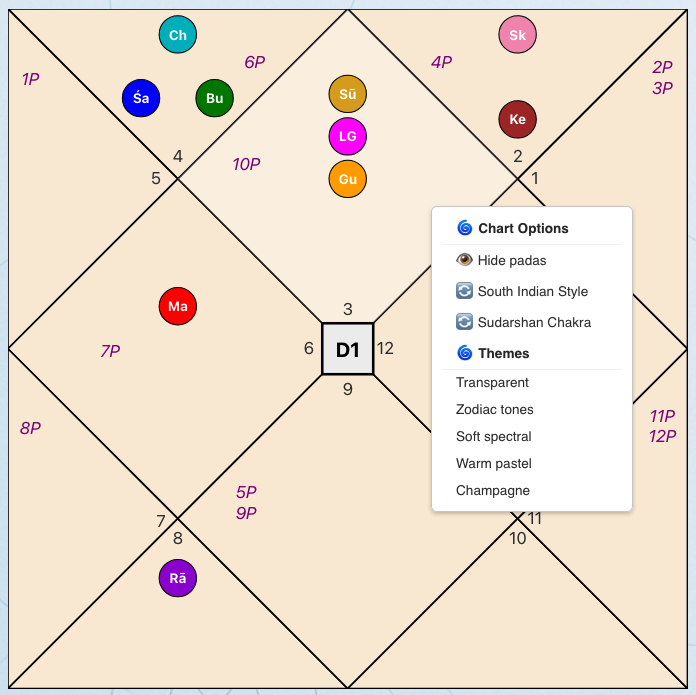
Right-Click Chart Menu
Right-clicking anywhere on the chart opens a contextual menu.
From here you can:
- Toggle Padas on or off
- Change visual presentation styles
- Switch chart themes
This keeps advanced display options accessible but unobtrusive.
!Menu
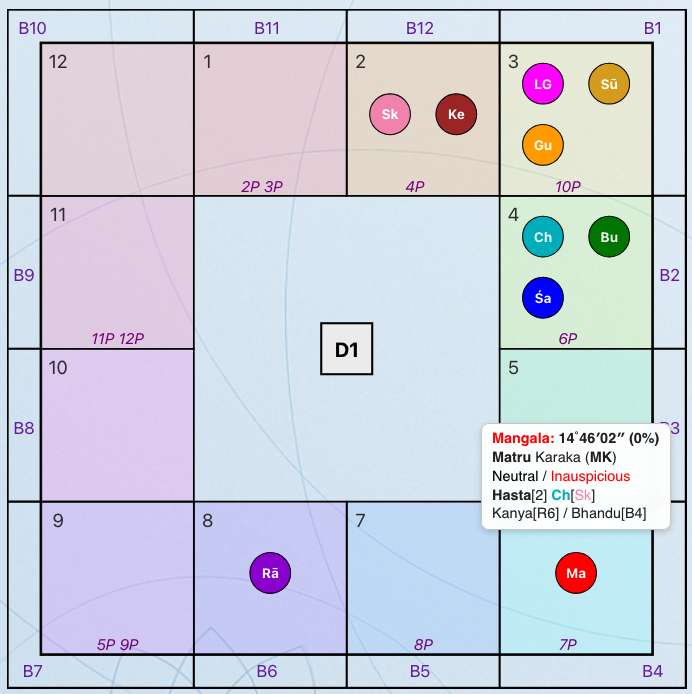
Graha Tooltips (Quick Lookup)
When hovering over a Graha (planet):
- A tooltip window appears.
- It displays additional information for quick reference.
Depending on context, this may include:
- Graha | Degree | Combustion
- Jaimini Karaka Info
- Dignity | Function
- Nakshtra[Pada] | Nakshatra Dispositor[Nakshatra Pada Dispositor]
- Rashi | Bhava
This allows fast inspection without leaving the chart view.
⸻
Chart Rotation (North Indian Style)
In the North Indian chart, you can rotate the chart orientation seamlessly:
- Click on a specific Bhava or Graha.
- That Bhava will move to the 1st Bhava (top position).
- All Grahas rotate accordingly.
To return to the original orientation:
- Click on the Lagna.
This feature is especially useful for:
- Bhava-focused analysis
- Graha-centered study
- Teaching and demonstration
⸻
Chart Manipulation Toolbar
Above each chart is a dedicated toolbar allowing further manipulation:
- Multi-Chart View (4-Chart Mode)
- Context switching (Birth, Gochara, Prashna)
- Graha/upagraha selection
- Chart shifting/ Now button (for Gochara)
- Layout control
- Additional chart tools
The toolbar allows dynamic recalculation without leaving the chart view.
!Menu
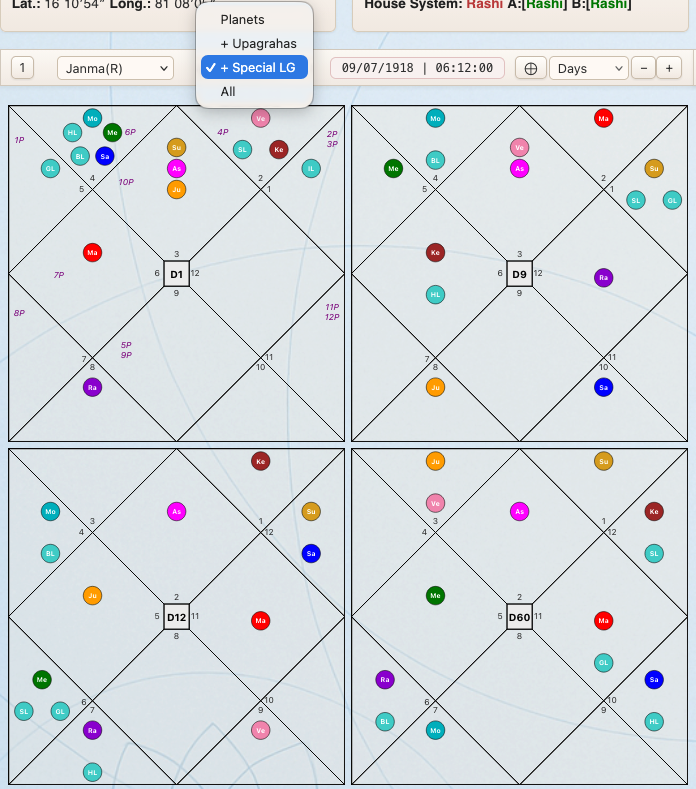
Multi-Chart View (4-Chart Mode)
By clicking the “4” button, you can display four charts simultaneously.
This is useful for:
- Comparing divisional charts
- Comparing contexts (Birth vs Gochara)
- Teaching and presentation
Click the “1” button to return to single-chart mode.
⸻
Graha Group Selection
The Group Selection option allows you to control which celestial factors are displayed in the chart.
This feature provides clarity during analysis by letting you reduce visual complexity or expand the display when deeper study is required.
You can choose between the following groups:
Grahas
Displays only the nine classical Grahas: Surya, Chandra, Mangal, Budh, Guru, Shukra, Shani, Rahu, Ketu
This mode is recommended for standard chart reading and most classical interpretations.
+ Upagrahas
Displays:
- All Grahas
- All Upagrahas
Useful for more technical analysis involving secondary planetary points.
+ Special Lagnas
Displays:
- All Grahas
- All Special Lagnas
This mode is helpful when analyzing derived ascendants and Lagna-based techniques.
All
Displays all Grahas, Upagrahas and Special Lagnas
⸻
Divisional Charts (D1–D60)
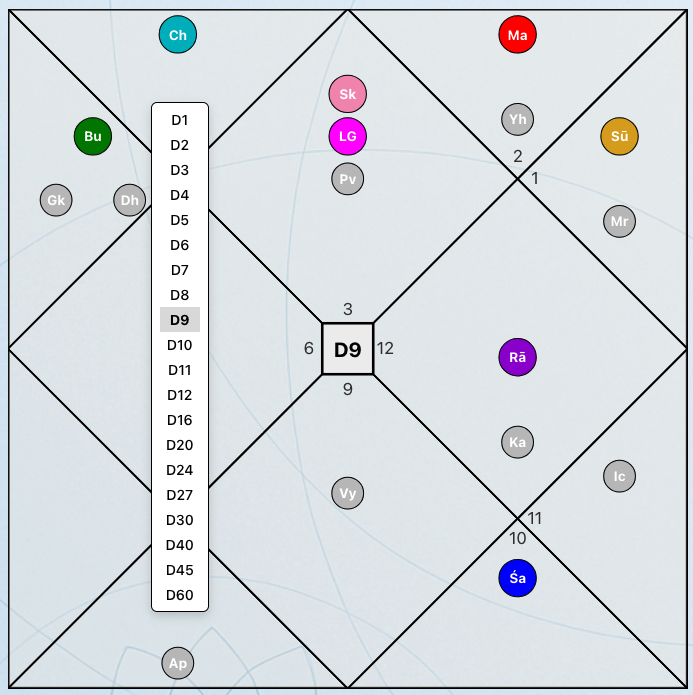
To change the divisional chart:
- Click on the small rectangle in the center of the chart.
- A selector menu appears.
- Choose the desired divisional chart (D1–D60).
The chart updates instantly while preserving your layout and display settings.
!Menu
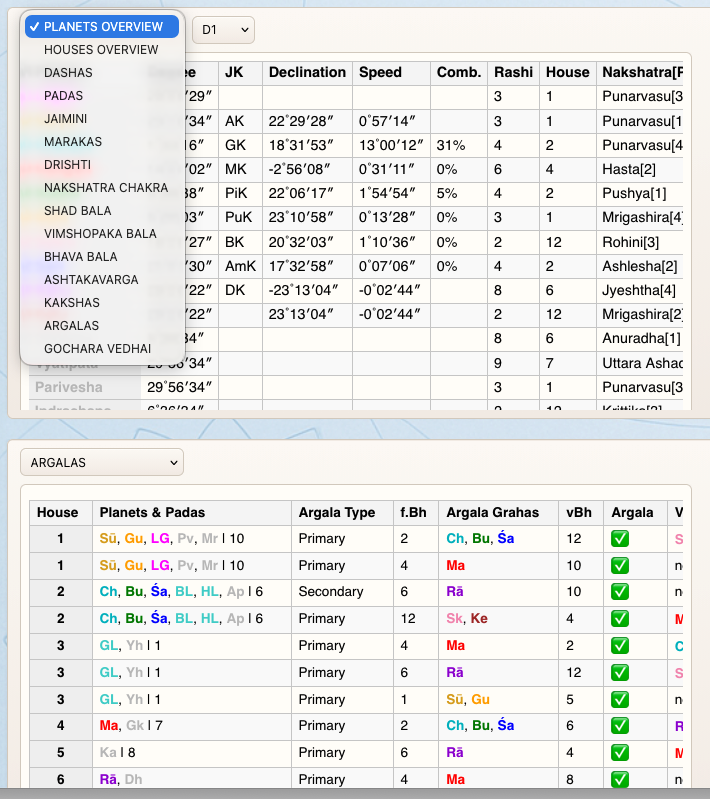
Detailed Analysis View (Below the Chart)
Below the main chart area is the detailed analysis section.
This area allows focused study of:
- Dashas
- Padas(Arudha)
- Strength calculations (Shadbala, Vimshopaka, Bhava Bala)
- And other advanced metrics
The detailed view is designed to support structured, topic-based examination of the chart.
!Menu
Design Philosophy
The chart interface in Prashna Online is designed to:
- Preserve classical structure
- Maintain professional clarity
- Provide interactive depth without visual overload
- Support both study and serious practice
Every interactive feature exists to enhance analytical precision—not to distract from it.